






In the modern data landscape, JSON (JavaScript Object Notation) has cemented its position as the lingua franca of data exchange. From web APIs and NoSQL databases to complex geographical datasets like GeoJSON, JSON’s flexibility and readability make it the format of choice for developers worldwide. However, this flexibility comes with a hidden cost: as datasets scale into the gigabyte range, the standard tools for handling JSON often buckle under the weight of memory constraints.
For many Python developers, the standard json library is the go-to solution. While it is elegant and highly efficient for small-to-medium files, it follows a "load-everything" paradigm. When faced with massive JSON structures, this approach can quickly lead to memory exhaustion, application crashes, and significant performance degradation. This article explores the limitations of traditional parsing and demonstrates how iterative streaming—specifically through the ijson library—provides a scalable, memory-efficient alternative for data-intensive Python applications.
The Core Problem: Why "Load-Everything" Fails
To understand the challenge, we must first look at how Python’s built-in json.load() function operates. When you pass a file handle to json.load(), the function reads the entire contents of the file, parses the structural markers, and constructs a corresponding tree of Python dictionaries, lists, strings, and numeric types in your system’s RAM.
The Memory Inflation Phenomenon
It is a common misconception that a 500 MB JSON file on disk will occupy 500 MB in memory. In reality, the memory footprint is often several times larger than the file size. This is because Python objects—even simple integers or strings—carry overhead. A dictionary object in Python, for instance, requires significantly more memory than the raw text representation of its keys and values. When you multiply this by hundreds of thousands of records, the cumulative memory footprint can cause even high-memory cloud instances to fail.
Furthermore, most data-processing tasks rarely require the entire dataset to be loaded into memory simultaneously. If you are analyzing a list of 200,000 geographic parcels, you likely only need specific attributes from each record—such as a street name or a parcel ID—rather than the thousands of coordinate points defining the polygon boundary of every single parcel. Standard json.load() forces you to load the "geometry" data even if you intend to discard it immediately, resulting in wasted resources.
Chronology of an Experiment: Analyzing San Francisco City Lots
To illustrate the stark difference between monolithic loading and iterative streaming, we conducted a controlled experiment using the San Francisco City Lots dataset, a standard GeoJSON collection containing 206,560 parcels.
Phase 1: The Monolithic Approach
Initially, we utilized the standard json module to parse the 181 MB citylots.json file. The workflow was straightforward:
- Open the file.
- Parse the entire structure into a
datadictionary. - Access the
featureslist. - Iterate through the list to count occurrences of "Market Street" and collect the first five parcel IDs.
The execution was simple, but the performance metrics were revealing. The script took approximately 4.01 seconds to complete. While the time is manageable, the memory profile was the primary concern. Using memory-profiler, we observed that the memory usage spiked to over 800 MiB the moment json.load() was executed. The program essentially held the entire 181 MB file—plus the massive overhead of thousands of Python dictionary objects—in active memory.
Phase 2: The Iterative Transition
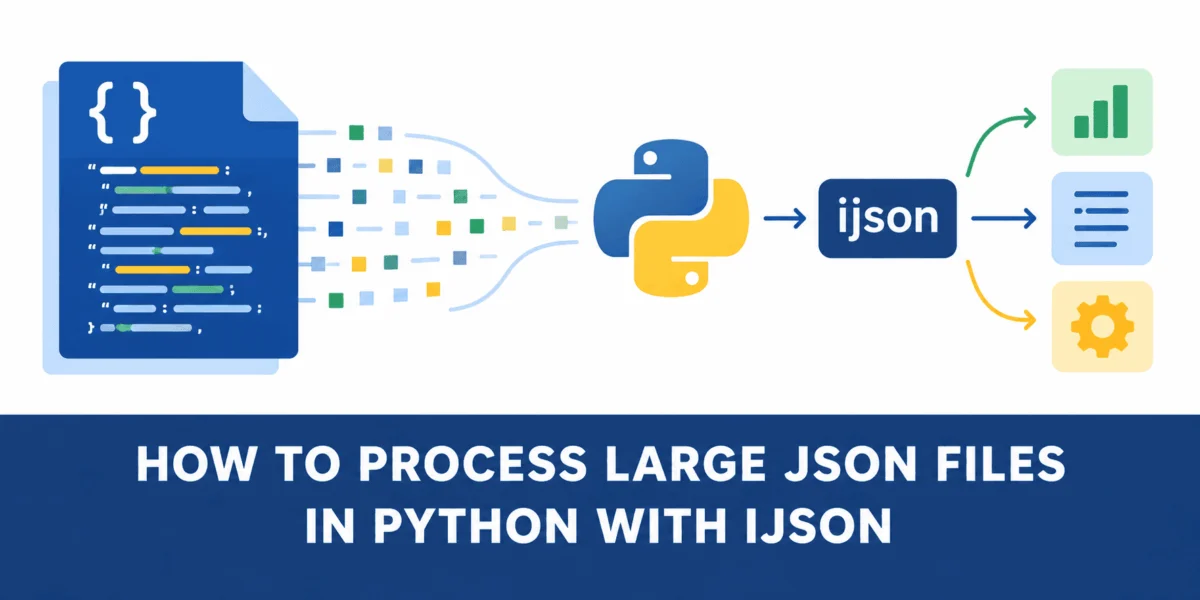
Next, we replaced the monolithic approach with ijson, an iterative JSON parser. Unlike the standard library, ijson does not wait for the entire document to be parsed. Instead, it reads the file in chunks and yields Python objects as it encounters them in the stream. By targeting the features.item path, we instructed the parser to return individual parcels one by one. The logic shifted from "load, then iterate" to "read, process, and discard."
Supporting Data: Comparing the Architectures
The impact of shifting from a monolithic to an iterative architecture is profound. The following table summarizes the comparative performance based on our experiment:
| Metric | json.load() (Monolithic) |
ijson.items() (Iterative) |
|---|---|---|
| Input Size | 181 MB | 181 MB |
| Peak Memory Usage | 808.9 MiB | 46.1 MiB |
| Processing Logic | Load all objects into RAM | Stream objects one by one |
| Efficiency Gain | Baseline | ~762.8 MiB reduction |
As the data shows, ijson reduces peak memory consumption by nearly 95%. This is the difference between an application that runs on a low-cost virtual machine and one that requires an expensive, high-RAM production server.
Official Perspectives and Best Practices
Industry experts and library maintainers emphasize that the choice of JSON parser should be dictated by the "data-to-memory ratio." For configuration files or small API responses, the json library is optimal due to its speed and native implementation. However, for data science pipelines, log analysis, or processing large-scale geographical data, iterative parsing is considered a best-practice requirement.
When to use ijson
- Large File Sizes: When the file size approaches or exceeds the available RAM of your execution environment.
- Streaming APIs: When consuming data from a socket or a continuous data stream where the total size is unknown or potentially infinite.
- Partial Processing: When your application only needs a subset of the fields within a large object (e.g., extracting names from a massive list of user profiles).
When to Stick with json
- Small Data: If the file size is negligible (e.g., < 50 MB), the overhead of setting up an iterative parser may actually be slower than the highly optimized C-based standard
jsonmodule. - Random Access: If your application requires frequent, random access to various parts of the data structure, loading the entire object into memory is usually necessary.
Implications for Future Development
The transition toward iterative processing has significant implications for how we design data-heavy applications. As datasets grow—fueled by the rise of IoT sensors, real-time analytics, and high-fidelity mapping data—the reliance on memory-bound processing models is becoming a technical bottleneck.
Scalability and Sustainability
By adopting ijson, developers create more sustainable applications. Lower memory consumption means smaller container sizes, reduced cloud compute costs, and a smaller carbon footprint for data centers. Furthermore, it improves the robustness of data pipelines; an application that streams data is inherently more resilient to "Out of Memory" (OOM) errors that often plague batch-processing systems.
Enhancing Workflow with ijson
Implementing ijson is remarkably intuitive for those familiar with Python’s file handling. By using the ijson.items() method, developers can define a prefix—such as "features.item"—that allows the parser to focus on the exact level of the hierarchy needed. This effectively turns a massive, intimidating file into a simple, manageable sequence of records.
Conclusion
The "load-everything" paradigm, while convenient for small scripts, is a relic of an era where datasets were small enough to fit comfortably in RAM. In the current era of big data, efficiency is no longer optional. The San Francisco City Lots experiment clearly demonstrates that we do not need to sacrifice convenience to achieve massive performance gains.
By leveraging the power of iterative parsing with ijson, developers can bridge the gap between small-scale scripts and large-scale data systems. The shift from "load, parse, and store" to "read, process, and discard" is not merely an optimization—it is a fundamental change in philosophy that allows Python applications to process data of any size, limited only by time, not by the hardware capacity of the server. Whether you are a machine learning engineer handling training sets or a backend developer managing massive API logs, iterative JSON processing is an essential tool in your modern developer toolkit.