







As artificial intelligence deepens its integration into the daily rhythms of enterprise work, platform customization has become a critical battleground. For users of Anthropic’s Claude, diving into the "Customize" settings often brings a wave of nomenclature confusion. Is a task best handled by a Skill, an MCP connector, or a Plugin?
While casual conversation often treats these terms as interchangeable buzzwords, they serve distinct, architectural purposes within the Claude ecosystem. Understanding how they function—and how they work together—is the difference between an ad-hoc AI experiment and a standardized, enterprise-grade workflow.
Main Facts: Deconstructing the Three-Layer Model
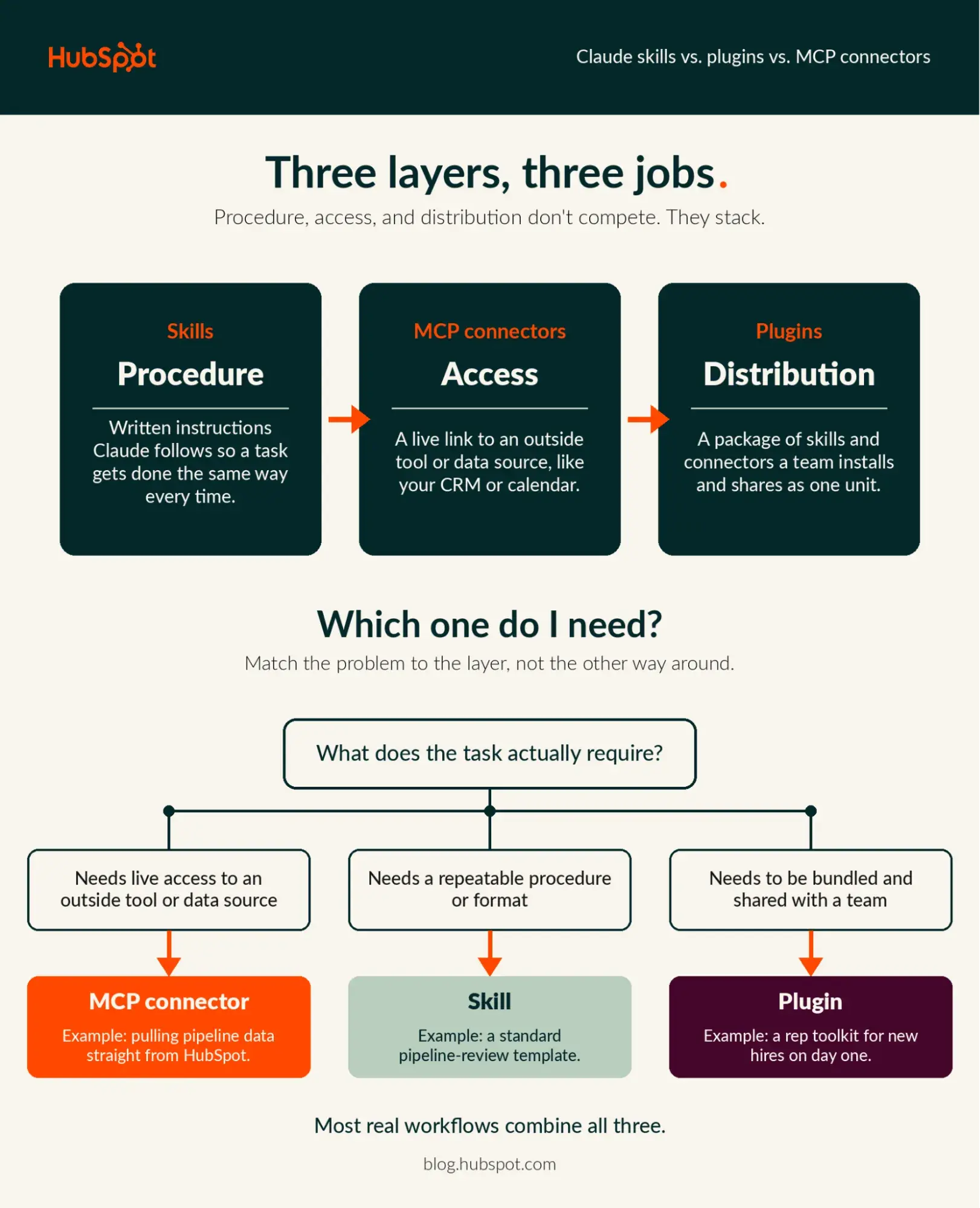
The easiest way to conceptualize Claude’s modular architecture is to separate access, procedure, and distribution. Each layer answers a fundamentally different question regarding how Claude interacts with your tools, data, and teams.
1. MCP Connectors Are About Access
An MCP (Model Context Protocol) connector serves as the bridge between Claude and your external enterprise infrastructure. Whether it’s your local file system, corporate calendar, issue tracker, or CRM, a live connection known as an MCP server (typically run by the external service itself) allows Claude to read data and take actions.
Crucially, connectors operate under your existing security permissions. If a user is unauthorized to view a specific deal stage in a CRM, the Claude connector respects those boundaries, preventing the AI from escalating user privileges.
2. Skills Are About Procedure
If a connector provides the where and what, a Skill provides the how. A Skill is a curated set of written instructions—frequently accompanied by reference files and executable scripts—that Claude loads dynamically whenever a user prompt triggers its domain.
Skills dictate procedure: your company’s proprietary reporting format, an editorial review checklist, or a strict brand voice guideline. While a Skill can instruct Claude on how to process data pulled from a connector, it cannot independently reach out to a live external service on its own. That is strictly the domain of the MCP connector.
3. Plugins Are About Distribution
Plugins act as the packaging and delivery mechanism. Instead of requiring every member of a team to manually configure individual skills and connectors, a Plugin bundles skills, MCP connectors, commands, and sub-agents into a single, cohesive software package.

Installing a Plugin executes all configurations in a single step, making them ideal for organization-wide rollouts.
Chronology: The Evolution of Modular AI Integration
The journey toward modular, highly customized AI assistants has evolved rapidly over the past several years as organizations transitioned from general-purpose chatbots to specialized workflows.
- The Early Era of Prompt Engineering (Pre-2023): Users relied heavily on manual copy-pasting and lengthy system prompts to force LLMs to adopt specific personas or formats. Every single interaction required recreating the operational context from scratch.
- The Rise of API Integrations and Custom GPTs (2023–2024): Platforms began introducing custom plugins and actions, allowing LLMs to ping specific APIs. However, these integrations were often brittle, lacked standardized security handshakes, and required complex custom coding for every new tool.
- The Advent of the Model Context Protocol (MCP): Anthropic and industry partners pushed toward open standards for connecting AI models to data sources. MCP standardized how servers expose tools and data to clients like Claude, turning fragmented API wrappers into secure, native connections.
- The Modularization of Skills and Plugins (Current State): With the introduction of granular Skills and unified Plugins, organizations can now codify internal procedures, pair them with live MCP connectors (such as the HubSpot Claude connector), and distribute them seamlessly across enterprise departments.
Supporting Data: The Multi-LLM Enterprise Reality
The push toward modular AI components is not happening in a vacuum; it is a direct response to how modern organizations operate. Recent data highlights a profound shift in enterprise software consumption:
- Multi-LLM Adoption: Recent platform analytics and ecosystem changelogs reveal that over 50% of enterprise customers utilize multiple Large Language Models (LLMs) to drive daily operations. This data underscores why flexible, interoperable context layers—like MCP connectors—matter more than locking an organization into a single proprietary ecosystem.
- Administrative Efficiency: According to enterprise deployment metrics, standardizing workflows via Plugins reduces onboarding time for AI-driven processes by up to 80% compared to manual, user-by-user configuration.
- Security Scrutiny: With automated validation scans running on public plugin directories, compliance teams are increasingly leaning toward centralized distribution models to mitigate the risks of rogue script execution.
Official Responses and Ecosystem Governance
As organizations scale their use of Skills, Plugins, and MCP connectors, platform governance, security, and data privacy have taken center stage. Anthropic and its ecosystem partners have established several frameworks to govern these layers.
Rigorous Vetting and Plugin Validation
Anthropic runs automated validation protocols and security scans on every plugin version submitted to its public directory, followed by a mandatory human review before any listing goes live. However, platform architects issue a vital warning: this review does not extend to plugins uploaded via unofficial marketplace URLs or local files. Enterprises are strongly advised to restrict unverified local uploads.
Granular Tool-Level Permissions
When deploying an MCP connector, administrators retain fine-grained control over what actions the AI can execute. Actions can be systematically categorized into protocols such as:
- Always Allow: For low-risk, read-only data pulls.
- Needs Approval: For operations that modify data (e.g., updating a support ticket or drafting an email).
- Blocked: For sensitive actions that must remain strictly human-led.
Enterprise Governance and Audit Trails
For organizations utilizing Team and Enterprise plans, administrative controls offer robust oversight:
- Version History and Rollbacks: Admins can review a plugin’s complete version history and instantly revert to a previous iteration if an update introduces bugs or workflow disruptions.
- Compliance and Audit Logs: Enterprise organization owners can export comprehensive audit log data directly from privacy settings, or stream it programmatically via Anthropic’s Compliance API into third-party security information and event management (SIEM) tools.
Implications: Building the Ideal Combined Workflow
To truly understand the value of these three architectural layers, one must look at how they operate in concert. Consider a real-world enterprise scenario: The Weekly Sales Pipeline Review.

- The Access Layer (MCP Connector): With the HubSpot Claude connector enabled, Claude securely queries active deal stages, recent stakeholder engagements, and pipeline velocity metrics straight from HubSpot—constrained entirely by the individual user’s existing permissions.
- The Procedure Layer (Skill): A deployed Skill instructs Claude on how to parse that raw CRM data. It dictates the exact structural format required by executive leadership, highlights stalled deals based on custom thresholds, and flags accounts that "need attention."
- The Distribution Layer (Plugin): Rather than forcing every sales manager to independently link HubSpot and configure the pipeline review Skill, a sales operations lead packages both components into a single Plugin. A one-click enterprise deployment rolls the entire workflow out to the entire sales department simultaneously.
Departmental Use Cases
- Marketing: A connector pulls campaign performance metrics from enterprise analytics tools; a Skill applies brand voice guidelines and generates automated quarterly post-mortem reports.
- Sales: A connector interfaces with CRM deal boards; a Skill structures the data into concise, predictive forecasting summaries for executive check-ins.
- Service: A connector queries open support tickets; a Skill analyzes sentiment trends and drafts comprehensive customer escalation briefs for tier-2 support leads.
Frequently Asked Questions
Do I need a developer to use Skills, Plugins, or MCP connectors?
No. Consuming existing resources from verified directories is entirely point-and-click via Claude’s Customize settings. Writing a custom Skill typically requires nothing more than plain text instructions in a structured markdown file. However, building custom MCP servers or submitting plugins to public repositories requires software engineering resources.
What is the core difference between Claude Skills and MCP in a single sentence?
A Skill teaches Claude how to execute a procedure, while MCP provides the secure protocol that grants Claude access to the external tools and data required to perform that procedure.
When should I package a workflow as a Plugin rather than relying on a standalone Skill?
Transition a workflow to a Plugin the moment it requires distribution across multiple team members, or when a specific Skill relies heavily on a dedicated, pre-configured MCP connector that would otherwise require manual setup by every individual user.
Can enterprise connectors introduce security vulnerabilities by bypassing existing data permissions?
No. Connectors like the HubSpot Claude connector explicitly inherit and respect the access controls already established within the host platform. If a user cannot view a record natively in their CRM, Claude cannot access it through the connector.
Conclusion: Solving Problems with the Right Tool
Skills, plugins, and MCP connectors are not competing tiers of a hierarchy; they are three distinct tools built for separate jobs. Sustainable, high-impact AI workflows almost universally leverage them in combination.
By starting small—identifying a single manual process, connecting the necessary data source via MCP, codifying the procedure into a Skill, and eventually scaling it out via a Plugin—organizations can move beyond experimental chatbots and build robust, secure, and repeatable AI-driven operations.