









By Dwayne Cubbins | Technology Journalist
Updated and Expanded Feature Report
For as long as ephemeral content has dominated social media, a universal digital panic has plagued creators, brands, and everyday users alike: the dreaded post-publish typo.
Picture the scenario. You spend precious minutes crafting the perfect Instagram Story, carefully curating a background track, aligning witty text overlays, positioning engaging stickers, and hitting publish. Three seconds later, your eyes lock onto a glaring spelling error. Traditionally, your options were grim: leave the humiliating mistake for all your followers to see, or delete the Story entirely, fix the asset, and repost—thereby sacrificing every single view, like, reply, and algorithmic push you had already accumulated.
That frustrating rite of passage is officially a thing of the past.

Instagram has formally rolled out a heavily requested feature allowing users to edit their Stories after they have gone live. Best of all? Your hard-earned metrics remain completely untouched.
Main Facts: What’s New in Instagram’s Latest Update?
The headline-grabbing update is straightforward: Instagram users can now modify the textual and visual elements of a live Story up to 15 minutes after initial posting.
According to announcements from Instagram leadership, including head of Instagram Adam Mosseri, the capability covers a broad suite of creative layers. Users can adjust:
- Text overlays (fixing typos, changing phrasing, or updating fonts)
- Music tracks (swapping out audio or changing timestamps)
- Interactive stickers (adjusting placement, types, or prompts)
- Drawings and doodles (cleaning up freehand annotations)
Crucially, executing these edits does not reset your analytics. Views, likes, and direct message replies continue to accumulate uninterrupted.

However, transparency is part of the deal. Once a Story has been modified, Instagram applies a subtle "Edited" label to the post, letting your audience know that a post-publish polish took place. If you don’t see the edit option on your app immediately, don’t panic—Meta has confirmed the feature is rolling out globally in phases.
Chronology: The Long Road to the Edit Button
While the ability to edit content after publication has become commonplace on platforms like X (formerly Twitter) and in comment sections across the web, ephemeral content formats like Stories have historically resisted retrospective changes due to their temporary, real-time nature.
- The Pre-2026 Status Quo: For years, Instagram maintained a strict "delete-and-repost" policy for Stories. If a creator spotted a mistake, fixing it required wiping the slate clean and starting over with zero engagement metrics, which severely punished users for minor oversights.
- Early Iterations and Experiments: Recognizing user frustration, Instagram quietly tested early prototypes of a Story-editing tool in previous development cycles. However, these early experiments came with a major catch: while users could change text or visuals, doing so completely wiped out the underlying metrics, resetting likes and comments to zero.
- The Breakthrough Release: Abandoning the metric-reset penalty, Instagram engineers successfully decoupled the content-rendering engine from the analytics ledger. This breakthrough allows the platform to swap out the front-end media payload while maintaining the back-end engagement database.
- The Companion Updates: Alongside the edit button, Instagram dropped three additional quality-of-life updates for Stories: streamlined multi-select for bulk photo uploads, intelligent background fillers (utilizing blur, color, and gradient fills to prevent black bars on mismatched photo dimensions), and a completely reorganized sticker panel featuring structured "sticker sheets" for easier browsing.
Supporting Data & User Experience: How to Edit Your Story
While the feature is a massive win for user experience, it
comes with a strict operational constraint: the 15-minute clock.

Step-by-Step Guide to Editing a Live Story:
- Navigate to the Post: Open your active Instagram Story from your profile or feed.
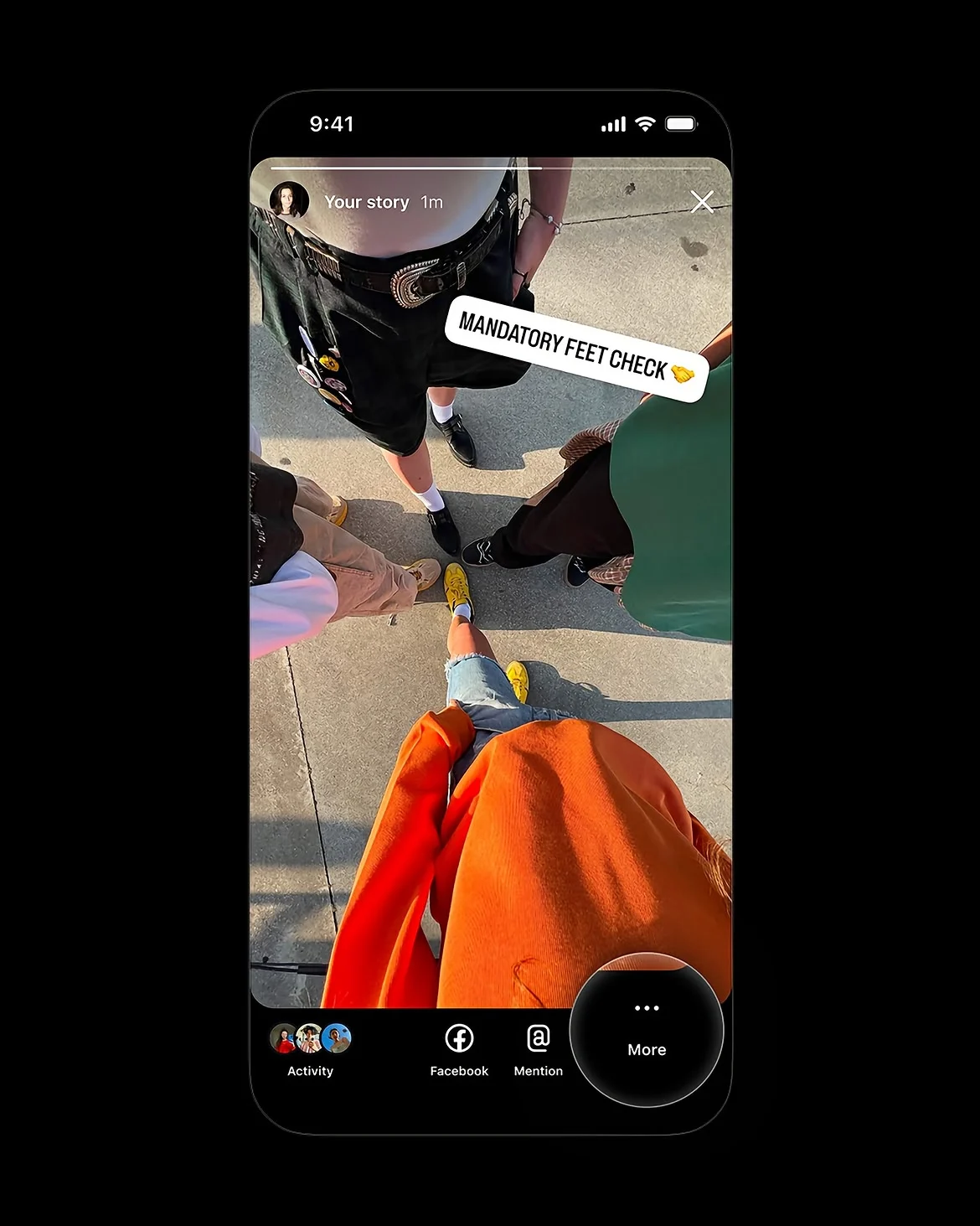
- Access the Menu: Tap the three-dot "More" menu located in the bottom-right corner of the screen.
- Select Edit: Tap the "Edit Story" option from the pop-up menu.
- Make Your Adjustments: The editor interface will reload, allowing you to drag, delete, or rewrite text, swap stickers, modify music, or tweak drawings.
- Save Changes: Confirm your updates. The Story will update seamlessly for your viewers, displaying the new "Edited" tag.
Note: The clock starts the exact second the Story is originally published. If you fail to catch the error within the 15-minute window, you will still be relegated to the traditional delete-and-repost routine.
Official Responses and Industry Context
The social media giant has framed the update as a direct response to consumer sentiment.
“If you’ve ever noticed a typo right after posting a Story, this one’s for you,” Adam Mosseri wrote in his announcement post, highlighting the everyday annoyance the feature aims to eliminate.
The update arrives amid a broader strategic shift at Meta. Over recent months, the company has heavily emphasized creator empowerment across its ecosystem. From rolling out advanced content protection tools to automatically detect and handle stolen video reels, to experimenting with standalone messaging applications like the regional Direct app, Meta is actively refining user friction points.

While the Story-editing feature is relatively minor compared to systemic anti-piracy algorithms or standalone messaging infrastructure, it addresses a universal micro-frustration. In an era where digital communication demands hyper-speed, giving users a tiny safety net to correct human error without algorithmic penalty goes a long way toward building platform goodwill.
Broader Implications: What This Means for Creators and Brands
For casual users, the 15-minute grace period simply means no more cringing at a misspelled word or a botched tag. But for professional creators, social media managers, and corporate brand accounts, the implications run deeper.
1. Reduced Pressure on High-Stakes Publishing
Social media managers handling enterprise accounts often operate under immense pressure. A single public typo on a major brand’s Story can spark professional embarrassment or require frantic stakeholder damage control. The edit button introduces a vital margin for human error, lowering the baseline anxiety of real-time publishing.
2. Preservation of Algorithmic Momentum
On platforms driven by algorithmic visibility, momentum is everything. When a Story goes live, its early engagement velocity signals to Instagram’s recommendation engines whether the content deserves higher placement or priority within viewer trays. Forcing a delete-and-repost cycle previously crippled that momentum by resetting engagement to zero. By keeping likes, views, and replies intact, the new feature ensures that fixing a typo doesn’t inadvertently tank a post’s reach.

3. The New Standard for Ephemeral Media
As Instagram successfully bridges the gap between permanence and ephemerality, competing platforms will likely take notice. Features like Snapchat Stories or TikTok Stories may soon face user pressure to adopt similar post-publish editing capabilities.
A Final Warning
As digital life grows increasingly automated—marked recently by milestones like the Cambridge Dictionary naming "human" its 2026 Word of the Year in reaction to the flood of AI-generated content—tools that embrace and accommodate our very human tendency to make mistakes are more valuable than ever.
Just remember: set a mental timer. The safety net disappears at minute sixteen, leaving you entirely at the mercy of your own proofreading skills.