







SAN FRANCISCO — Every Mac user knows the digital dread of opening the Downloads folder. For many, it is less of a directory and more of a digital landfill—a chaotic ecosystem where screenshots, compressed archives, forgotten PDFs, application installers, and invoices go to accumulate dust. While macOS has evolved dramatically over the years with features like Stacks, Spotlight, and advanced Finder integrations, the fundamental friction of manual file management remains unbroken.
Enter Binky, a new native macOS utility designed to tackle this exact pain point. Developed as an open-source project under the MIT license, Binky aims to replace the anxiety of digital clutter with absolute predictability. Rather than relying on clumsy cloud-based scripts or heavy, sluggish cross-platform wrappers, Binky utilizes a modern native stack (SwiftUI and AppKit) to offer a streamlined, privacy-focused approach to automated file sorting.
As digital workflows grow increasingly complex and remote work generates unprecedented volumes of transient files, utilities like Binky are shifting from niche developer tools to essential modern desktop enhancements.
Main Facts: What Is Binky and How Does It Work?
At its core, Binky is a file-routing assistant for macOS (requiring macOS 14 Sonoma or later) that monitors, cleans, and organizes designated folders on your Mac. Whether it is your Downloads directory, Desktop, a shared corporate Dropbox inbox, or a cluttered project archive, Binky intercepts the chaos and sorts assets into logical, user-defined categories.
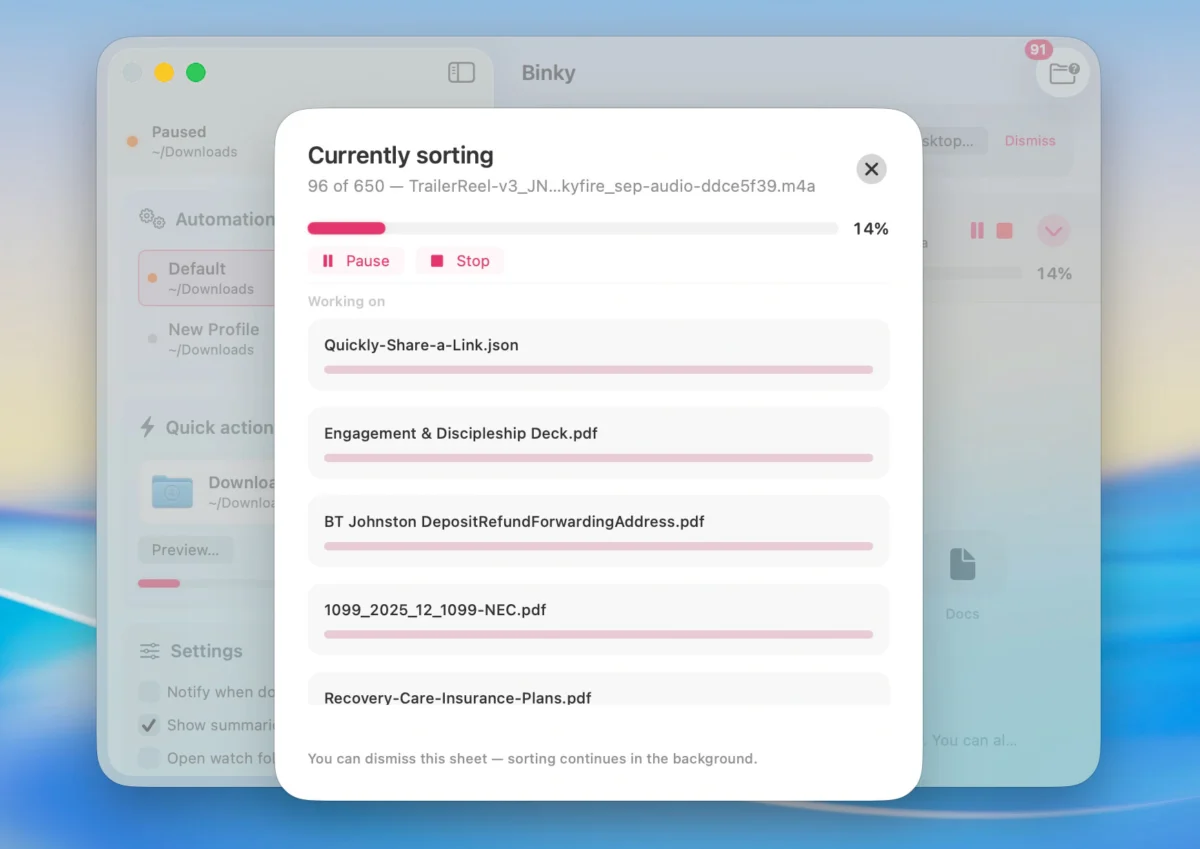
Out of the box, the application routes files into predictable destinations such as Images, PDFs, Media, Documents, Archives, Apps, Screenshots, and Miscellaneous. However, its true value lies in its granular control. Binky operates through two primary mechanisms: Quick Sort for immediate, one-off cleanups, and Routines for continuous, automated background monitoring.
Furthermore, safety is a core architectural pillar of the application. Binky is engineered to wait until files finish arriving—preventing the disastrous scenario of a utility attempting to move a massive video file or application installer halfway through its download cycle. It also features collision-safe moving mechanisms, ensuring that two files sharing identical names never inadvertently overwrite one another.
For ambiguous items—files that do not cleanly match pre-set parameters—Binky avoids hazardous guesswork, routing them safely into a dedicated Review folder for manual evaluation.
Chronology: The Evolution of Mac File Management Utilities
The quest to automate macOS file management spans decades, reflecting how user interaction with personal computers has shifted over time.
- The Early OS X Era (Early 2000s): Advanced users relied heavily on AppleScript, Folder Actions, and rudimentary shell scripts. While powerful, these solutions required deep technical knowledge and frequently broke across major operating system updates.
- The Rise of Third-Party Automation (2010s): Applications like Hazel dominated the Mac power-user ecosystem. Hazel introduced rule-based folder monitoring, allowing users to watch specific directories and execute actions based on metadata, names, and dates. While robust, these commercial tools often came with a learning curve and proprietary pricing models.
- The Modern Native Movement (Present Day): With the deprecation of older scripting paradigms and the introduction of advanced Apple frameworks like SwiftUI, modern developers are leaning toward lightweight, transparent, and open-source solutions. Binky represents this newest wave: native performance, tightly integrated with modern macOS frameworks, distributed for free under open-source terms.
Supporting Data: Features, Automation, and Developer Integration
Unlike traditional, rigid file sorters that rely solely on basic file extensions (like .pdf or .png), Binky offers a comprehensive rule engine capable of parsing deep file metadata.
Granular Rule Engines
Binky’s rules can match files based on a wide array of parameters:
- File name and extension
- File kind and size
- Creation and modification dates
- File origin (such as web-download provenance)
- OCR (Optical Character Recognition) and receipt detection hints
- Finder tag conditions
When a rule is triggered, Binky can execute multiple actions: moving the file, renaming it, applying specific Finder tags, automatically extracting compressed archives, installing applications from Disk Images (.dmg), trashing unwanted matches, or fanning files out into distinct directories by tag.
Ecosystem Integration
Binky is built to blend seamlessly into existing macOS workflows rather than forcing users to adopt a closed-loop proprietary environment:
- Finder Quick Actions and Services: Users can select files directly within Finder, right-click, and select Sort with Binky to instantly trigger custom sorting protocols.
- Apple Shortcuts Support: Binky includes a native Sort Files action, enabling users to incorporate the sorting engine directly into complex personal automation chains using the macOS Shortcuts app.
- Command-Line Interface (CLI): For developers, system administrators, and terminal power-users, a native
binkycommand-line tool is bundled with the application. This allows users to preview sorting actions, run background Routines directly from Terminal, or integrate Binky’s rules into custom shell scripts.
To ensure transparency, Binky maintains a comprehensive history and batch summary log. Users can review precisely which files were moved, skipped, or sent to the Review queue, with standard macOS Undo functionality supported where applicable.
Official Responses and Privacy Considerations
In an era where desktop utilities frequently harvest telemetry or demand cloud-account logins, the development team behind Binky has emphasized a strict zero-cloud architecture.
"The point is not clever file management. It is predictable file management," note the developers behind the project. "There is no cloud account involved. Sorting happens entirely locally on your Mac, and Binky does not upload, track, or share your files."
Because Binky moves files rather than copying them—transferring assets securely from the source inbox to their designated final home without leaving lingering duplicates—it guarantees that local disk space is optimized cleanly. Furthermore, the application operates strictly while running; it does not install invasive kernel-level extensions or background daemons that consume system memory when the app is closed.
Implications: The Future of Desktop Workflow Optimization
The release of Binky arrives at a time when digital clutter is increasingly recognized as a hidden productivity drain. Studies in human-computer interaction frequently highlight how messy desktops and chaotic download directories contribute to cognitive fatigue, breaking concentration and slowing down daily task execution.
For Mac users, tools like Binky signal a shift toward "micro-automation"—lightweight, hyper-focused utilities that solve a single specific friction point without demanding a complete overhaul of personal workflows. By offering an open-source, free, and deeply native alternative to commercial folder-monitoring applications, Binky lowers the barrier to entry for clean digital housekeeping.
The Bottom Line
For professionals, creatives, and casual users alike, Binky transforms the traditional Mac "junk drawer" into a self-maintaining ecosystem. By pointing the application at chronically messy directories, configuring a handful of intelligent rules, and leaning on the safety net of the Review queue, users can reclaim hours of lost time previously wasted on manual file organization.
Binky is available now for download as a free DMG installer via its official website, binkyfiles.com, requiring macOS 14 Sonoma or later.