






Navigating the financial decisions behind software subscriptions can make or break a digital business’s profit margins. For course creators, coaches, and digital marketers relying heavily on live streaming, WebinarJam remains a staple platform. However, a recurring dilemma dominates user reviews and community forums: Does locking into an annual billing cycle genuinely pay off, or are creators better off sticking with monthly flexibility?
To answer this, a comprehensive evaluation of current pricing structures, features, tool consolidation, and user feedback reveals when an annual commitment is a smart financial move—and when it is a trap.
Main Facts: The Core of WebinarJam’s Pricing and Platform
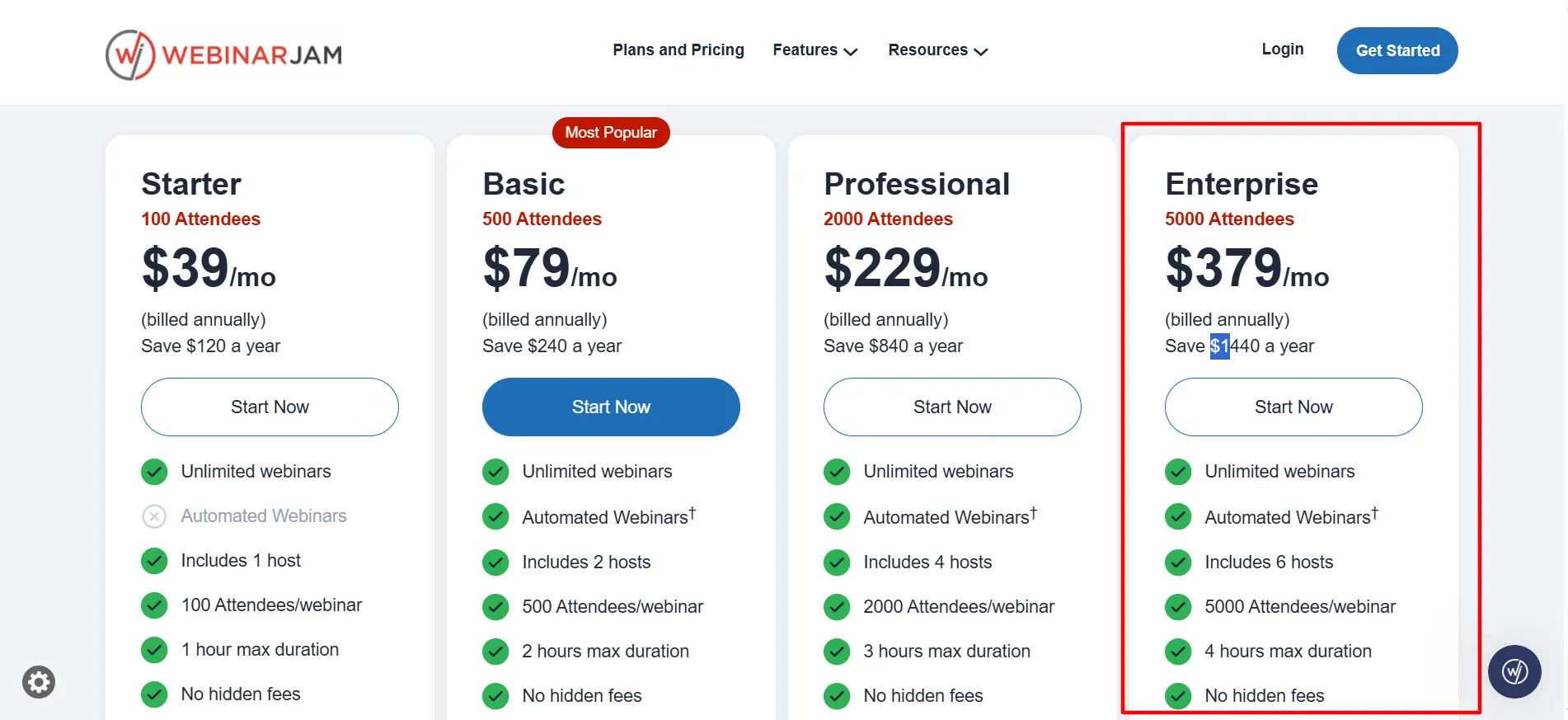
At its foundational level, WebinarJam offers four main tiers: Starter, Basic, Professional, and Enterprise. While the monthly pricing plan allows for flexible, month-to-month budgeting, transitioning to an annual billing structure significantly drops the effective monthly cost.
Pricing and Savings Breakdown
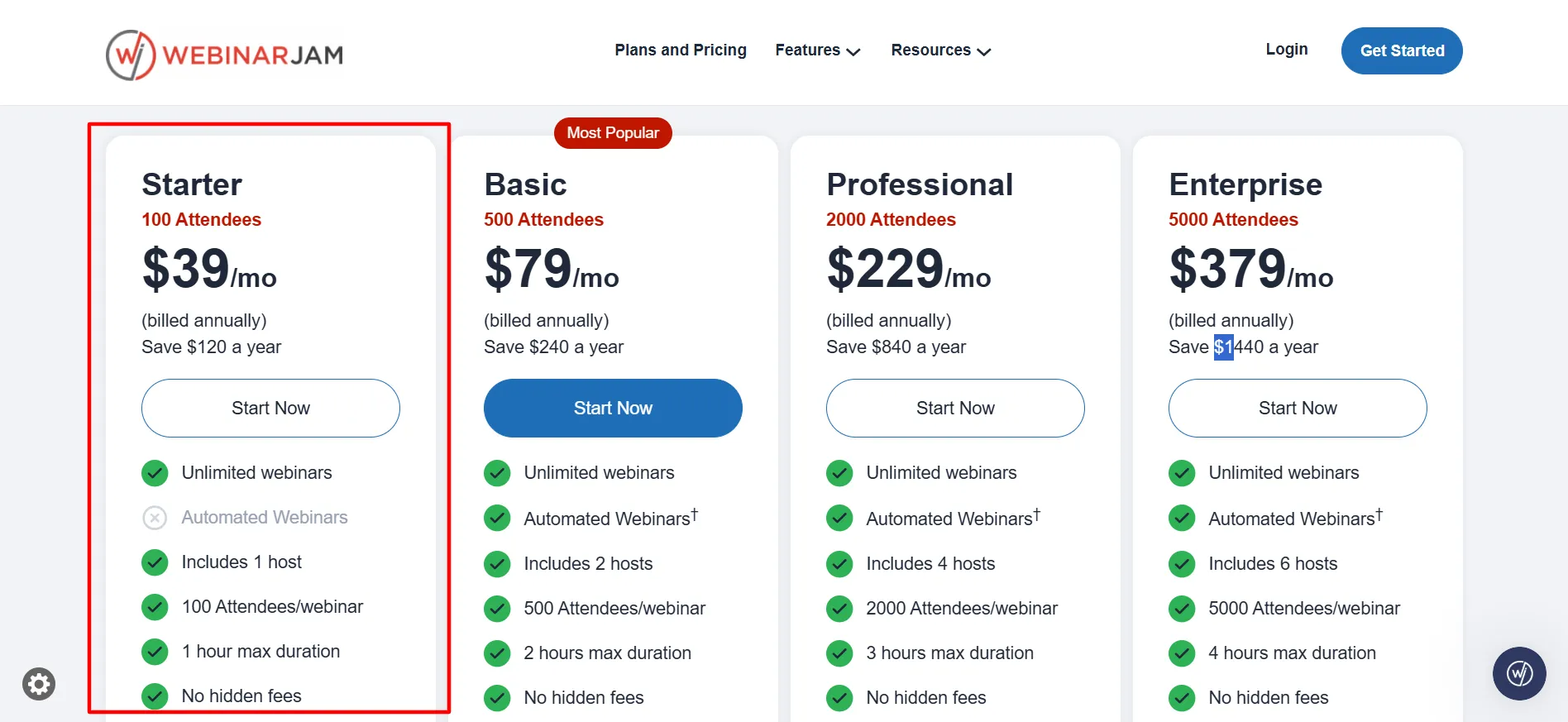
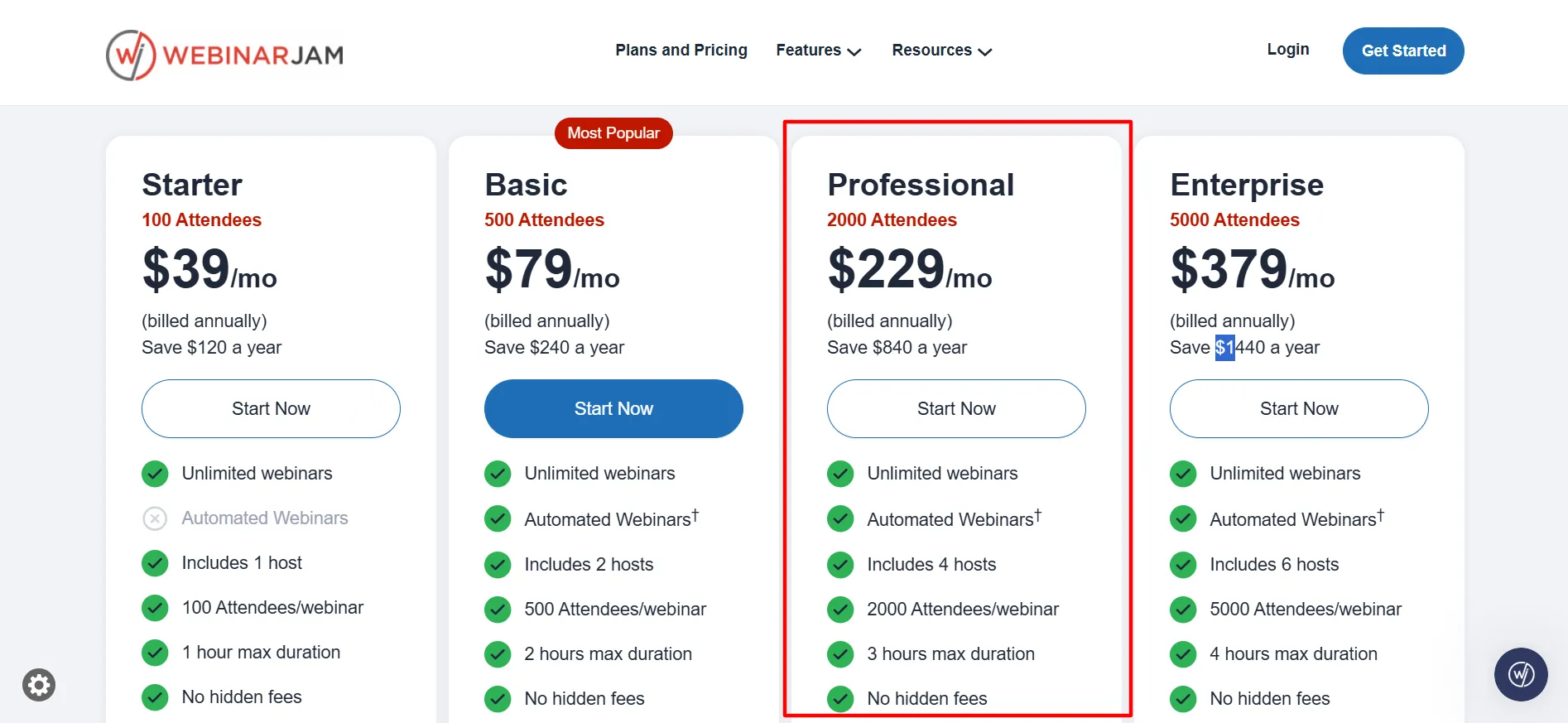
- Starter: Drops from $49/month to an annual equivalent of $39/month (Saves $120/year). Includes 100 attendees, 1 host, and 1-hour maximum duration.
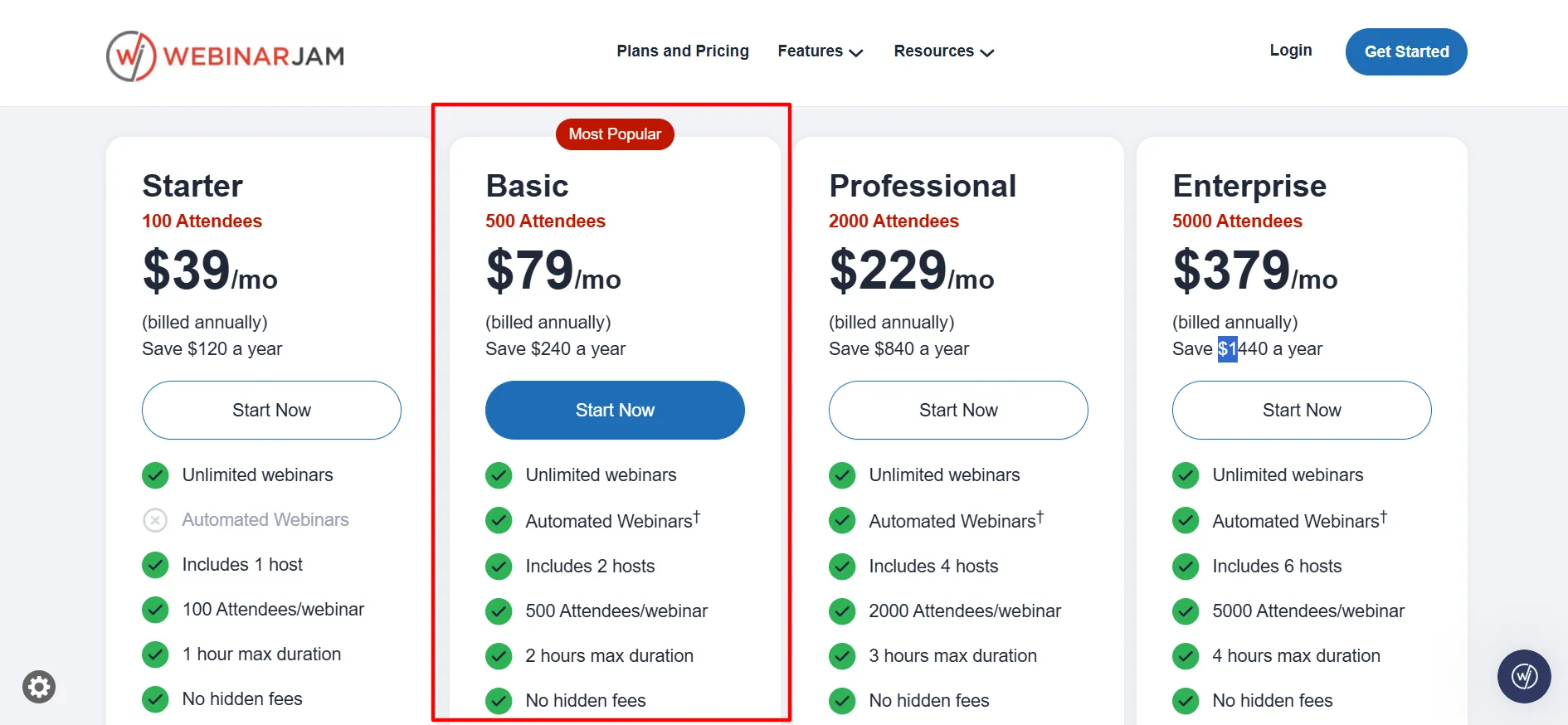
- Basic: Drops from $99/month to an annual equivalent of $79/month (Saves $240/year). Includes 500 attendees, 2 hosts, and 2-hour maximum duration.
- Professional: Drops from $299/month to an annual equivalent of $229/month (Saves $840/year). Includes 2,000 attendees, 4 hosts, and 3-hour maximum duration.
- Enterprise: Drops from $499/month to an annual equivalent of $379/month (Saves $1,440/year). Includes 5,000 attendees, 6 hosts, and 4-hour maximum duration.
Additionally, WebinarJam offers a 14-day trial for $1, which grants Basic-level access. This allows users to test the waters, host a live session with a real audience, and assess engagement metrics before any long-term financial commitment begins.
Chronology: The Evolution of WebinarJam’s Billing Tiers and User Testing
The debate between monthly and annual software subscriptions has evolved alongside the digital marketing landscape. In the early days of webinar software, month-to-month SaaS models dominated, allowing seasonal creators to spin up accounts only during specific product launch windows.
As the market matured, platforms like WebinarJam introduced aggressive discounting for annual lock-ins, incentivizing long-term user retention while providing predictable recurring revenue for the company.
- The Trial Phase: Prospective users sign up for the $1, 14-day trial. During this period, they experience unrestricted Basic-tier features to test stream stability, browser-based entry, and audience interaction tools.
- The Decision Window: Upon trial expiration, users face a critical choice: commit to an annual upfront payment or absorb a higher monthly operational cost.
- The Post-Purchase Safety Net: Recognizing that yearly commitments can cause buyer’s remorse, WebinarJam enforces a 30-day money-back guarantee following any paid annual purchase. This gives users a full month to evaluate platform performance, customer support, and return on investment under real-world launch conditions.
Supporting Data: Feature Utility and Platform Performance
According to aggregated data from major software review repositories like Capterra, WebinarJam maintains a solid rating hovering around 3.9 out of 5 stars across hundreds of user reviews. G2 ratings trend similarly near 3.6 out of 5 stars.
The driving force behind positive ratings is the platform’s consolidation of marketing tools. When calculating the true cost of webinar software, users must look beyond the base subscription price and factor in the external tools they are able to cancel.
Features That Drive ROI
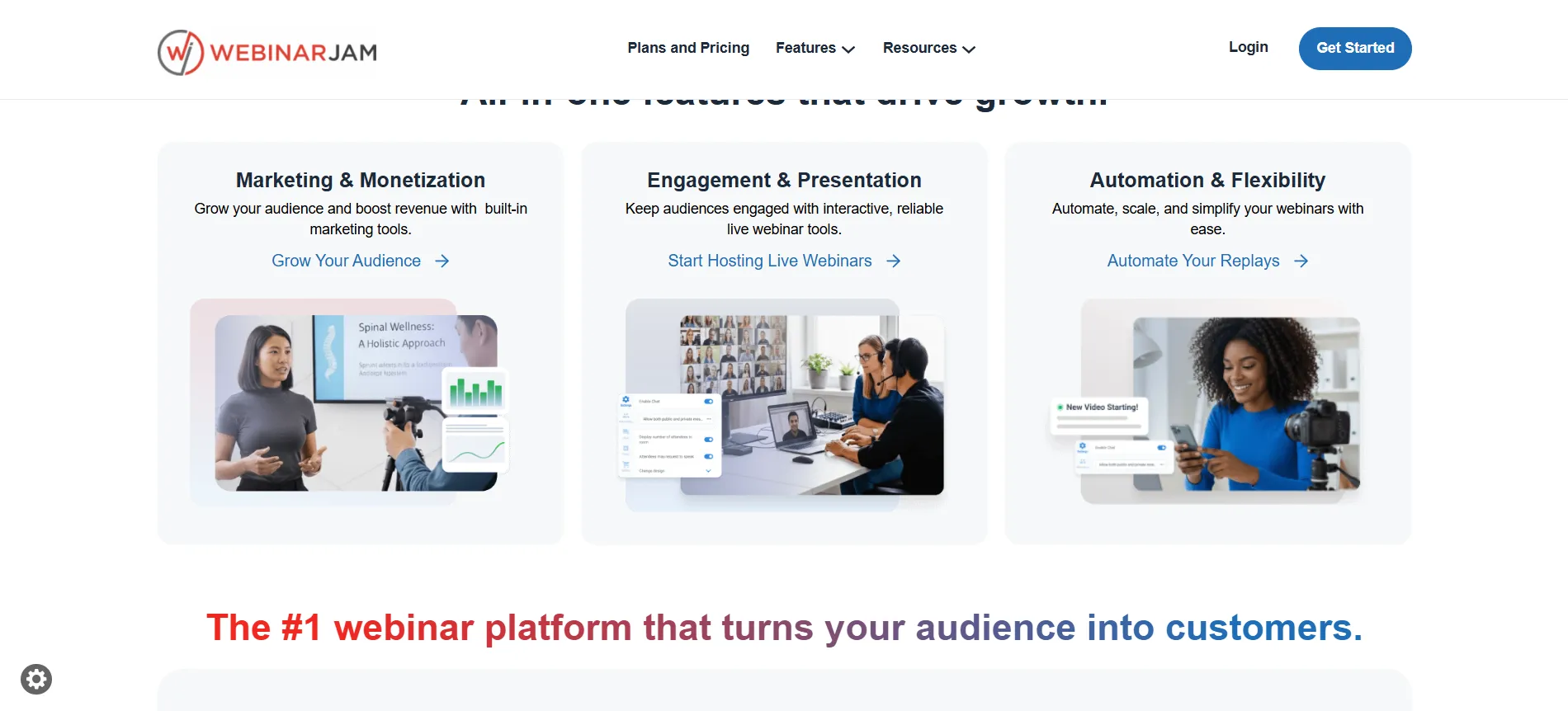
- Browser-Based Access: Attendees enter meetings with a single click—no downloads required. This frictionless entry directly increases show-up and retention rates.
- In-Session Sales Tools: Timed product offers can be deployed dynamically on-screen during live broadcasts, creating a sense of urgency that directly converts viewers into buyers.
- Interactive Elements: Live chat moderation, on-screen polls, surveys, and a digital whiteboard keep audience engagement high. Hosts can even pull individual attendees on-screen for live testimonials.
- Registration & Lead Capture: Fully customizable registration page templates paired with A/B testing allow creators to optimize conversion rates without buying third-party page builders like Leadpages or ClickFunnels.
- Automated Reminders: Integrated email and SMS reminder sequences run out of the same dashboard, minimizing missed sessions.
- Automated Webinars: Available on Basic tiers and higher, this feature lets creators transform recorded sessions into "evergreen" webinars that run automatically on a set schedule.
Official Responses and User Feedback
While the financial incentives of annual billing are clear on paper, user feedback highlights both the brilliance and the potential pitfalls of committing for twelve months.
The Positive Sentiment
Reviewers frequently note that the annual rate feels exceptionally fair once the platform replaces other disparate software. Creators running weekly courses or coaching sessions realize they no longer need separate email marketing software, landing page builders, or standalone video hosting tools. By cutting out these peripheral subscriptions, the annual savings compound rapidly.
The Critical Feedback
Conversely, critical reviews point to specific friction points. Some users report that customer support response times can occasionally lag during peak launch seasons. Others note that the user interface can feel somewhat dated compared to newer, hyper-minimalist streaming applications. Furthermore, reviewers heavily advise newcomers to fully execute a live webinar during the 14-day trial to surface any configuration questions before annual billing kicks in.
Implications: When Does an Annual Lock-In Actually Make Sense?
Choosing between monthly and annual billing is not merely a budgeting exercise; it is a strategic business decision dependent on your frequency of use and revenue model.
1. High-Frequency Hosts and Course Creators
If you run weekly live sessions, launch digital products regularly, or maintain a predictable funnel that generates continuous enrollment, the annual lock-in is a no-brainer. The savings range from $120 to $1,440 per year, and the consolidation of your tech stack pays for the upfront cost within the first quarter of use.
2. Small Teams and Growing Businesses
For small teams requiring multi-host capabilities without per-person surcharges, the Basic plan ($79/month billed annually) hits the sweet spot. It provides adequate capacity (500 attendees) and automated webinar functionality to run a lean, highly efficient digital operation.
3. Seasonal or Occasional Presenters
If you host only two or three webinars a year—perhaps for an annual product launch—locking into an annual subscription is financially unwise. Monthly billing, despite its higher per-month cost, prevents capital from being tied up in an idle platform for nine months out of the year.
Frequently Asked Questions (FAQs)
Q: Do I have to pay the entire yearly total upfront?
A: Yes. Annual billing requires an upfront payment for the full twelve months. However, a 30-day money-back guarantee applies to your paid purchase, allowing you to request a refund through support if the platform fails to meet your expectations.
Q: How much money do I actually save with annual billing?
A: Savings vary by tier. You save $120 annually on the Starter plan, $240 on Basic, $840 on Professional, and up to $1,440 on the Enterprise tier compared to paying month-to-month.
Q: Can I test the platform before committing to a yearly plan?
A: Yes. WebinarJam offers a 14-day trial for $1 that includes Basic-level access. This allows you to host a live session with your own audience before any annual charges begin.
Q: Is automated webinar support included on all annual plans?
A: Automated webinar tools are included on Basic, Professional, and Enterprise plans, but they are excluded from the entry-level Starter plan.
Q: What happens if I exceed my attendee cap during a live session?
A: Overage policies can result in restricted access or extra charges. It is always wise to choose a higher tier in advance if your registration numbers consistently push against your current plan’s limits.
Final Verdict
The annual billing option on WebinarJam is a powerful financial asset—provided your business model demands consistent, high-frequency live streaming.
For regular coaches, educators, and digital entrepreneurs, taking advantage of the $1 trial to test the software, followed by an annual commitment to the Basic or Professional tiers, dramatically lowers software overhead. By replacing separate landing page builders, email reminder software, and standalone webinar rooms, WebinarJam consolidates your tech stack into a single dashboard.
For occasional presenters, monthly billing remains the safer bet. But if your calendar is packed with weekly sessions designed to drive sales, locking in an annual plan offers a clear, compounding return on investment. Run a test session during your trial period, track your conversion metrics, and let your actual business data dictate your financial commitment.