






For digital publishers and content creators, empty ad spaces represent a direct loss of revenue and a disruption to the user experience. When Google AdSense fails to serve a targeted advertisement to a visitor, it often leaves an awkward, blank void on the webpage. While advancements in programmatic advertising and remarketing have drastically reduced the frequency of unfilled ad inventories, the issue remains a persistent hurdle for website owners striving for optimal monetization.
Fortunately, AdSense offers a fallback mechanism known as backup ads. However, the platform’s interface is notoriously unintuitive, leading many publishers to believe they are restricted to displaying static, unclickable images. This comprehensive guide explores the mechanics of AdSense fallback units, details a step-by-step methodology for deploying fully clickable HTML backup ads, and examines the broader implications for publisher revenue strategies.
Main Facts: The Challenge of Unfilled Ad Inventory
At its core, the problem of blank ad spaces stems from targeting limitations. When a user visits a webpage, the AdSense algorithm attempts to match the content with a relevant commercial advertiser. If no direct match is found and remarketing cookies are unavailable or blocked, the ad unit returns empty.
- The Revenue Impact: Unfilled ad units waste valuable digital real estate that could otherwise be utilized to promote affiliate products, house ads, or alternative monetization streams.
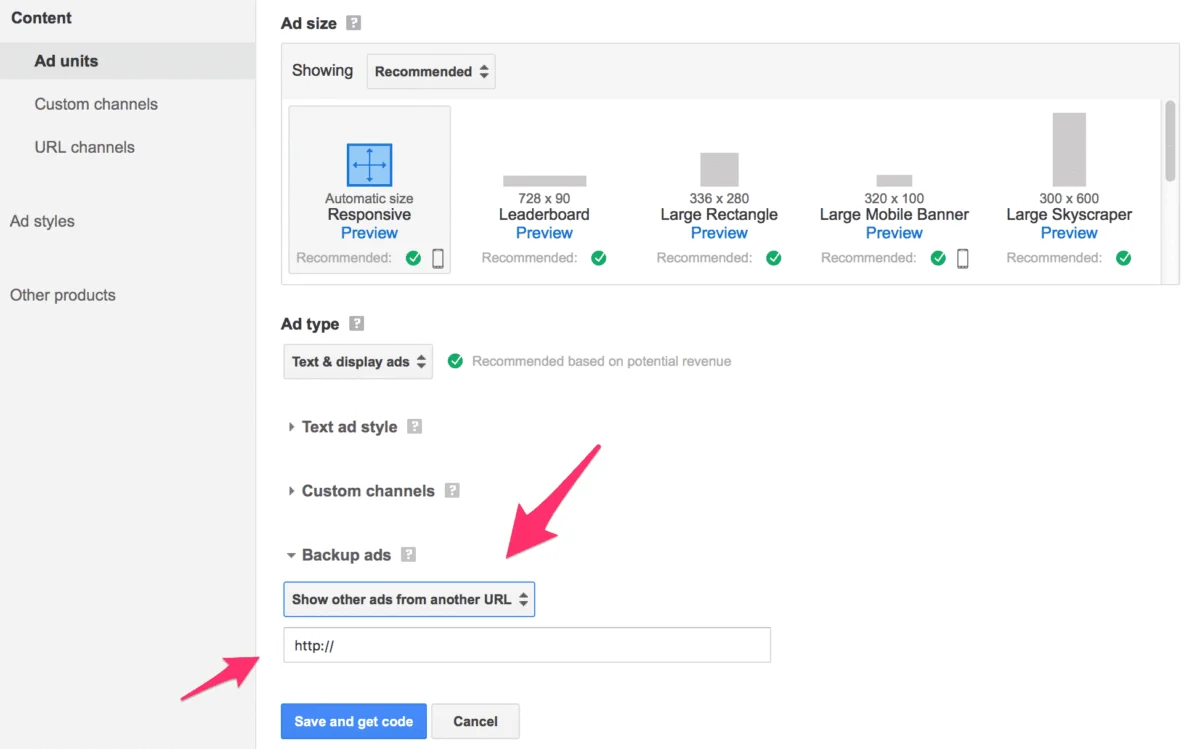
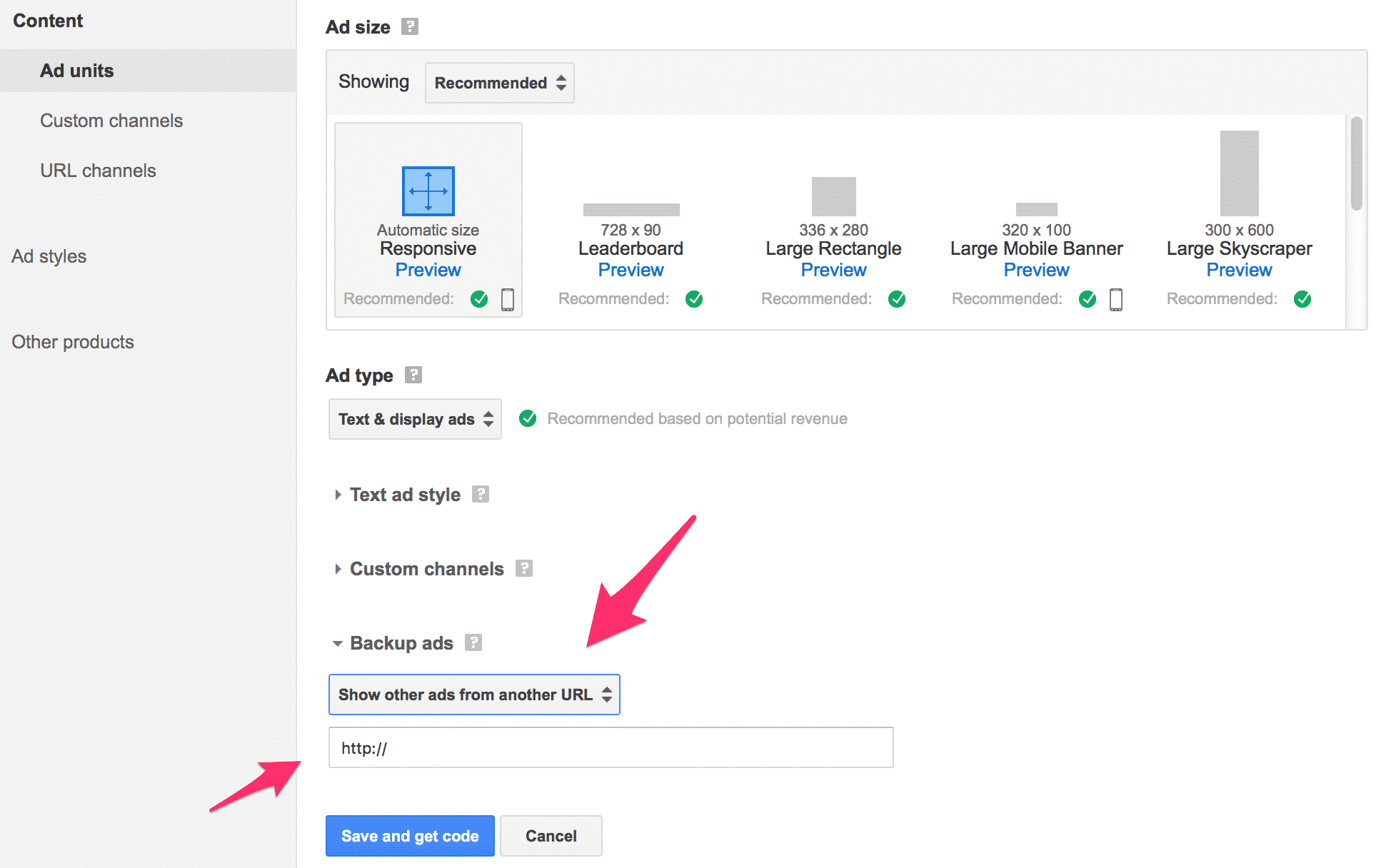
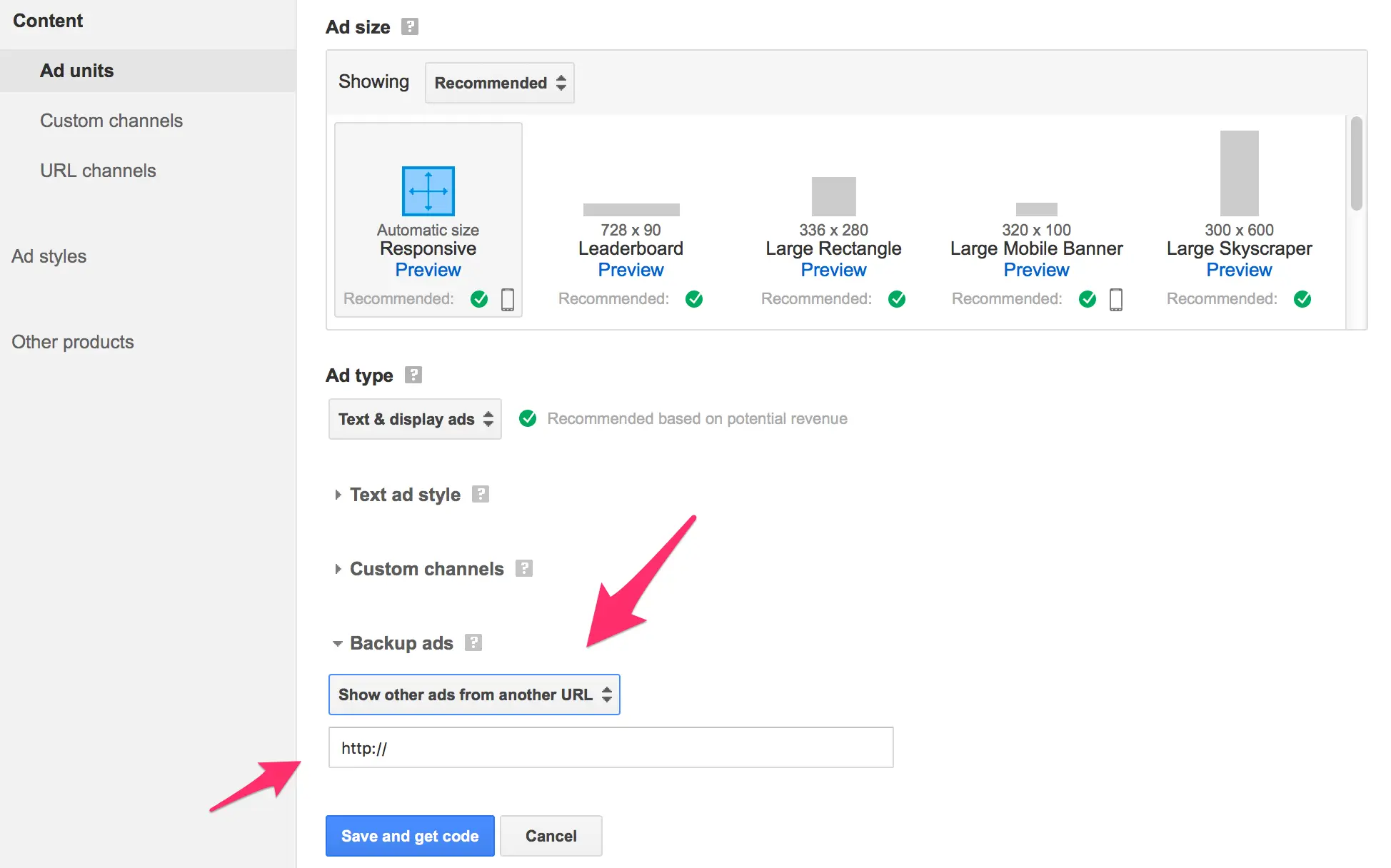
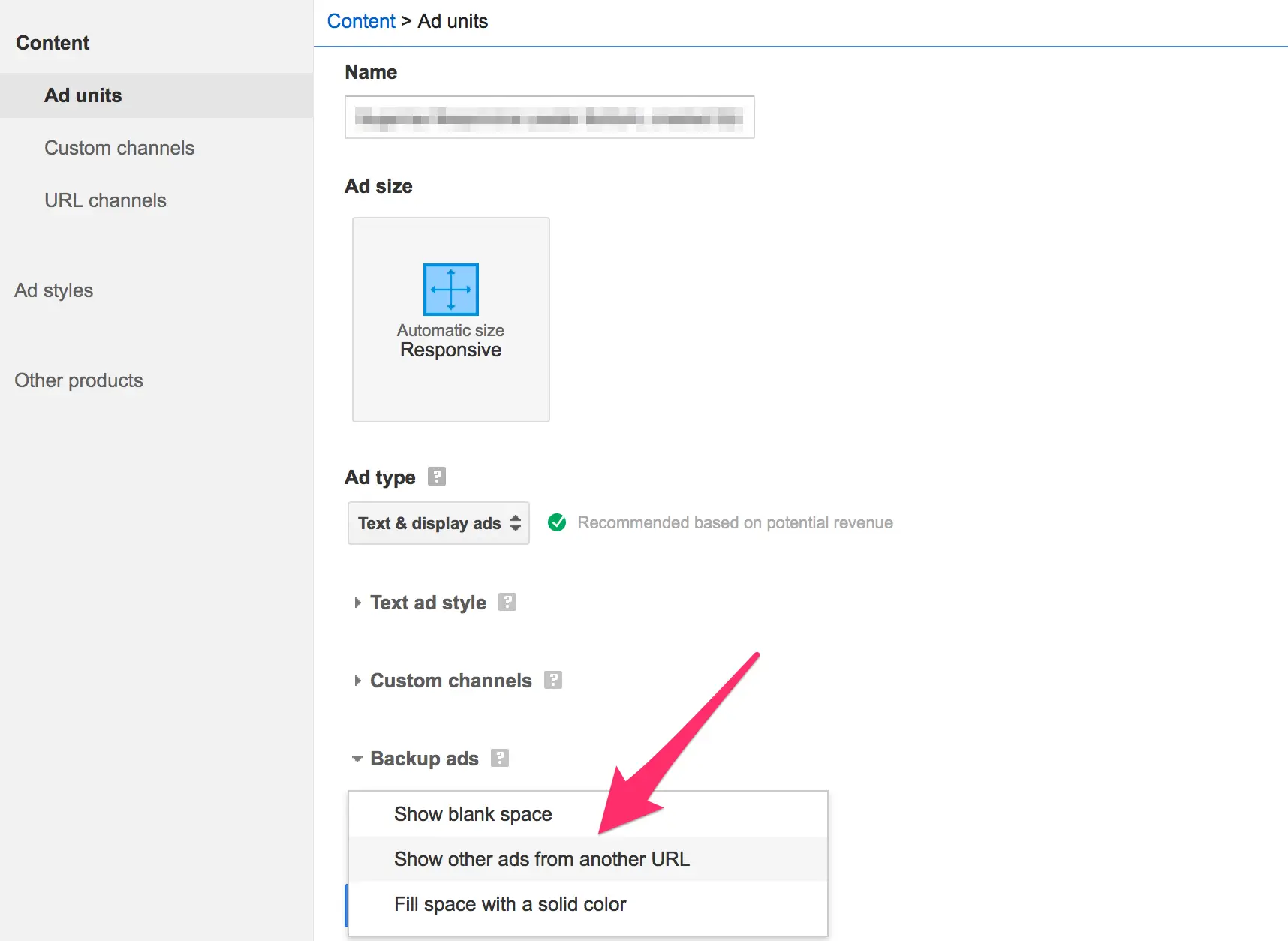
- The Interface Limitation: When configuring an AdSense unit, publishers can select a fallback option. The drop-down menu permits choosing a solid color, a blank space, or a "backup ad." However, the configuration field only asks for a single URL.
- The Hidden Potential: Because the interface only prompts for a URL, most users assume they can input an image address, resulting in a dead, unclickable graphic. In reality, publishers can bypass this limitation by hosting a simple HTML wrapper page, transforming the backup image into a high-converting, clickable affiliate link.
Chronology of the AdSense Fallback Dilemma
The evolution of publisher monetization tools highlights a persistent gap between platform capabilities and user experience design.
- Early Ad-Serving Era: In the early days of programmatic advertising, empty ad slots were exceptionally common. Publishers frequently encountered blank spaces due to primitive keyword-matching algorithms and lower global digital ad spend.
- Introduction of Backup Controls: Google eventually introduced fallback options, allowing publishers to specify alternative content, such as a solid color or a custom URL, to prevent layout shifting and total revenue loss.
- The Single-Field Confusion: Despite updates to the dashboard interface over the years, the backup ad field remained stubbornly restricted to a single URL input. This design choice inadvertently locked out non-technical publishers from leveraging clickable fallback inventory.
- The Workaround Discovery: Savvy web developers and affiliate marketers soon discovered that pointing the AdSense backup URL to a lightweight, custom HTML file solved the limitation. By embedding an image inside an anchor tag (
<a>) within an HTML document, publishers could finally serve interactive creatives.
Supporting Data and Technical Implementation
Deploying a clickable backup ad requires a basic understanding of HTML file creation, server management, and tracking methodologies. Below is the technical roadmap required to bridge the gap in the AdSense dashboard.
Step 1: Crafting the HTML File
To trick the AdSense fallback mechanism into displaying a clickable link, publishers must create an independent HTML document.
Using a plain-text editor (such as Notepad on Windows or TextEdit on Mac, ensuring plain text formatting is enabled), input the following structural code:
<html>
<head>
<title></title>
</head>
<body>
<a href="YOUR AFFILIATE LINK" target="_top"><img src="YOUR AD IMAGE"></a>
</body>
</html>- Crucial Parameters:
- Replace
YOUR AFFILIATE LINKwith your target destination (such as an affiliate offer or internal landing page). - Replace
YOUR AD IMAGEwith the absolute URL of your banner creative. Ensure the dimensions match the exact pixel size of the parent AdSense unit. - The
target="_top"attribute is mandatory. Omitting this element can cause the linked page to open incorrectly within the constrained iframe of the ad unit.
- Replace
Step 2: Hosting the File on a Web Server
Once the code is customized and saved with a .html extension (e.g., backup-ad.html), upload the file to your web server via FTP or your host’s file manager. Google AdSense does not restrict where the file is hosted, provided it possesses a publicly accessible URL on the internet.
Step 3: Configuring the AdSense Dashboard
- Log in to your Google AdSense account.
- Navigate to your ad settings and select the specific ad unit you wish to modify.
- Locate the Backup Ads section and select the option for "Show other ads from another URL" from the drop-down menu.
- Paste the absolute URL of your newly uploaded HTML file into the designated field and save the changes.
Step 4: Implementing Advanced Click Tracking
Because standard analytics tools may struggle to isolate traffic originating exclusively from AdSense fallbacks, advanced publishers employ specific tracking mechanisms:
- Link Cloaking and Custom Slugs: Utilize plugins or redirect tools (such as Pretty Link Pro) to generate a unique, dedicated link specifically for the backup ad.
- SID Tracking: Where supported by affiliate networks, append Sub-ID parameters to your destination URLs to monitor exact click-through rates and resulting conversions generated solely by the fallback unit.
Official Responses and Platform Constraints
Despite widespread requests from the publisher community, Google has maintained a hands-off approach regarding testing and validation tools for backup ads.
- The Testing Void: Google does not currently provide a native testing environment or sandbox mode within the AdSense dashboard to preview whether a backup ad triggers and functions correctly. Publishers must rely on rigorous adherence to instructions, followed by monitoring server access logs to confirm when fallback files are requested by Google’s servers.
- Policy Compliance: Google’s official documentation recommends the use of absolute URLs for fallback links and mandates strict adherence to standard web policies. Backup ads must not violate general AdSense content guidelines—meaning affiliate offers, landing pages, and banner creatives must remain family-friendly, legal, and compliant with local advertising laws.
- Propagation Delays: Industry experts note that changes made to AdSense unit fallback parameters are not instantaneous. It may take several hours or even days for Google’s ad-serving infrastructure to register the updated HTML file URL across global content delivery networks.
Implications for Digital Publishers
Mastering the implementation of clickable backup ads carries profound strategic implications for anyone relying on programmatic display revenue.
1. Reclaiming Lost Revenue
Every impression that fails to display a primary ad represents wasted traffic. By replacing a blank space or a generic background color with a targeted affiliate banner or high-value house ad, publishers transform a total loss into a continuous monetization opportunity.
2. Enhancing User Experience (UX)
Layout shifts and sudden white spaces degrade the visual stability and professional aesthetic of a website. Fallback banners maintain visual continuity, ensuring that if a commercial advertiser passes on an impression, the space remains occupied by relevant, engaging media.
3. Diversifying Monetization Channels
Relying solely on contextual programmatic ads leaves publishers vulnerable to economic fluctuations in the ad tech market, seasonal dips in CPMs, or algorithmic policy shifts. Utilizing fallback units for direct affiliate marketing acts as a natural hedge, diversifying income streams and maximizing earnings per visitor (EPV).
Conclusion
While Google’s AdSense interface makes the process far more obscure than necessary, the technical workaround is well within reach for publishers willing to write a few lines of basic HTML. By taking control of unfilled inventory, digital creators can safeguard their earnings, optimize site layouts, and turn advertising misses into profitable conversions.