




By Cybersecurity Desk | Advanced Enterprise Technology Reporting
Published February 2025
Main Facts
The landscape of corporate identity and access management (IAM) is undergoing a monumental shift. Microsoft has officially announced a sweeping update to its authentication and recovery frameworks within Microsoft Entra ID (formerly Azure AD). The tech giant is systematically phasing out traditional, legacy authentication and self-service password reset (SSPR) methods—specifically SMS, voice calls, and security questions.
This move is designed to shepherd organizations away from vulnerable verification vectors and toward phishing-resistant alternatives such as passkeys and hardware-based security keys. While the transition heavily bolsters overall enterprise security postures, it creates immediate logistical and operational hurdles. Organizations employing non-desk, frontline, or remote workers who lack corporate smartphones or standard corporate devices now face a complex compliance and accessibility dilemma.
To bridge this gap, third-party identity vendors—such as Specops Software (an Outpost24 company)—are stepping in to provide flexible alternative workflows, like customized out-of-band one-time passwords (OTPs) and multi-layered service desk verification tools, ensuring that organizations do not have to sacrifice security for workforce accessibility.
Chronology and Timeline of the Phase-Out
Understanding the precise rollout schedule is critical for IT administrators and security teams racing to update their policies. Microsoft has orchestrated a staggered timeline to give enterprises breathing room, though the ultimate deadlines are unyielding:
- September 1, 2026: Microsoft began rolling out passkeys by default for public cloud users who were previously configured for SMS or voice authentication. During routine multi-factor authentication (MFA) sign-ins, these users are prompted to register passkeys, accelerating native adoption. (Note: Separate schedules apply to specialized government or sovereign cloud environments).
- October 30, 2026: Microsoft opens configuration pathways via the Microsoft Security Store. This allows enterprises with strict regulatory, technical, or legacy business requirements to contract with supported third-party telephony providers to retain SMS or voice authentication—though this workaround involves separate vendor agreements and financial overhead.
- February 1, 2027: The critical inflection point. Microsoft-provided SMS and voice authentication will be officially retired for the vast majority of Entra ID users, eliminating these channels as native MFA and SSPR verification vectors.
- March 2027: Security questions are completely stripped from native self-service password reset (SSPR) functionality, removing another decades-old fallback method from the Entra ID ecosystem.
Supporting Data and Security Context: Why Legacy Methods Must Die
The push toward elimination is driven by mounting empirical evidence surrounding the fragility of legacy credentials. SMS and voice authentication, while historically convenient, have long been criticized by cybersecurity professionals for their susceptibility to interception.

The Vulnerability of SMS and Voice
Text messages and voice calls travel over traditional telecommunication networks (such as SS7 vulnerabilities) that lack end-to-end encryption. Threat actors routinely exploit these weaknesses through:
- SIM Swapping: Attackers manipulate mobile carrier support staff into transferring a victim’s phone number to a rogue SIM card, granting them unfettered access to intercepted SMS 2FA codes.
- Interception and Man-in-the-Middle (MitM) Phishing: Advanced adversary-in-the-middle (AiTM) proxy kits can harvest session cookies and intercept real-time SMS codes with alarming ease.
The Flaws of Security Questions
Security questions suffer from human predictability and the perils of modern digital footprints. Mother’s maiden names, first pets, and high school mascots are frequently exposed via social media or corporate data breaches. Furthermore, they are inherently vulnerable to social engineering; helpdesk agents tricked by smooth-talking imposters often reset accounts simply because the caller guessed or researched a static security answer.
The Phishing-Resistant Alternative
By contrast, modern phishing-resistant credentials—such as FIDO2-compliant passkeys, Windows Hello for Business, and hardware security keys—rely on public-key cryptography. Because the private key never leaves the user’s trusted hardware device, even if a user is duped into visiting a convincing spoofed login page, the cryptographic handshake fails to authenticate with the malicious site.
Official Responses and Strategic Recommendations
Microsoft strongly recommends that organizations pivot aggressively toward modern, phishing-resistant ecosystems. The premier native recommendations include:
- Passkeys (FIDO2): Utilizing biometric verification (fingerprint, facial recognition) or PINs stored locally on trusted devices.
- Windows Hello for Business: Seamless biometric or PIN-based login tightly coupled with enterprise hardware.
- Microsoft Authenticator App: Utilizing number-matching push notifications and time-based one-time passwords (TOTP).
However, Microsoft’s native ecosystem leaves a notable gap: while passkeys and Windows Hello excel at daily authentication, they are not natively supported as SSPR verification methods. When an employee forgets a password or gets locked out of a shared workstation, they cannot easily use a hardware passkey to recover access without IT intervention.
According to Daniel Imber, Cybersecurity Writer at Specops Software, this creates a profound disconnect for diverse workforces:

"While the move aims to strengthen identity security, it also creates challenges for organizations with employees who cannot easily use the supported methods. Businesses relying on traditional verification methods must now rethink how employees authenticate and reset passwords."
Implications for Enterprises and Operational Workarounds
The removal of SMS, voice, and security questions forces organizations to radically re-evaluate how they handle two major operational scenarios: Self-Service Password Resets (SSPR) and Service Desk Help Desk Verifications.
1. Navigating the Frontline Worker Dilemma
For desk-bound corporate knowledge workers equipped with company-managed smartphones or laptops, transitioning to Microsoft Authenticator or passkeys is frictionless. However, for manufacturing floors, construction sites, retail spaces, and logistics hubs, the reality is starkly different:
- Employees may not have corporate smartphones.
- Shared workstations make personal device registration impractical.
- Regulatory compliance or union agreements may prohibit requiring personal smartphone usage for work tasks (BYOD friction).
To maintain flexible recovery processes without violating compliance or breaking security, organizations are increasingly turning to specialized third-party solutions that integrate directly with Active Directory and Microsoft Entra ID.
2. Specops uReset: Flexible Self-Service Without VPNs
To address the SSPR gap left by Microsoft’s shrinking native toolkit, tools like Specops uReset allow employees to securely reset their Active Directory and Entra ID credentials from any location, device, or browser—without requiring an active corporate VPN tunnel.
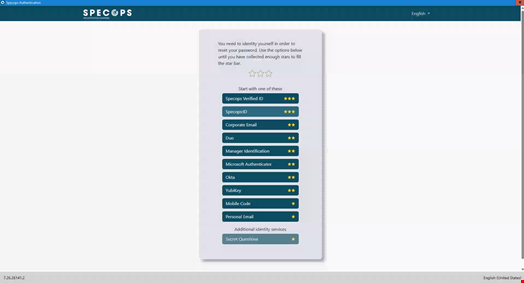
Crucially, Specops uReset preserves alternative verification methods that Microsoft is dropping, such as customizable one-time passwords (OTPs) delivered via alternative channels and robust security questions. Organizations can enforce layered verification policies—such as requiring an OTP followed by security questions—thereby maintaining familiar, highly accessible recovery options for frontline staff who cannot leverage Microsoft’s restricted native options. Furthermore, it updates locally cached Windows credentials, ensuring remote workers immediately regain workstation access.
3. Securing the IT Help Desk Against Social Engineering
When workers cannot utilize self-service resets, they inevitably call the IT service desk. This human-to-human interaction remains one of the primary vectors for devastating social engineering attacks. Helpdesk impersonation attacks—where bad actors pose as distressed executives or frontline employees to bypass security protocols—are on the rise.
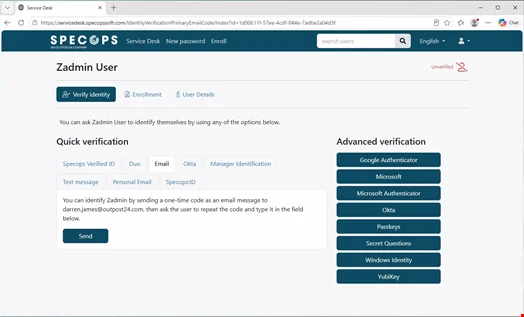
To neutralize this threat, Specops Secure Service Desk provides agents with a rigorous framework to verify callers before issuing password resets or account unlocks. Like its companion tool, it supports multi-factor checks (combining OTPs with contextual verification questions) and seamlessly logs all verification events into broader Security Operations Center (SOC) workflows for continuous monitoring and auditability.
How IT Administrators Should Prepare
With the February 2027 deadline looming, security leaders and IT administrators cannot afford to wait until the final hour. Experts recommend executing a phased preparation strategy immediately:
- Audit Existing User Populations: Identify every user, department, and role currently reliant on SMS, voice, or security questions for MFA or SSPR. Pay special attention to frontline, remote, and shared-device workers.
- Evaluate Alternative Hardware and Software: Assess the feasibility of deploying FIDO2 hardware security keys. Account for device distribution logistics, breakage/loss replacement costs, and user training.
- Test Native and Third-Party Workflows: Run pilot programs moving desk-based workers to passkeys and Microsoft Authenticator while testing specialized enterprise tools (such as Specops uReset and Secure Service Desk) for non-traditional user segments.
- Review Telephony Contingency Plans: If specific regulatory mandates force your organization to retain SMS or voice authentication, begin evaluating third-party telephony providers via the Microsoft Security Store ahead of the October 2026 configuration window.
- Update Security Policies: Revise internal documentation, helpdesk Standard Operating Procedures (SOPs), and user onboarding guides to reflect the approaching obsolescence of legacy verification mechanisms.
Conclusion
Microsoft’s sunsetting of SMS, voice, and security questions is a necessary, albeit disruptive, milestone in the evolution of enterprise cybersecurity. Phishing-resistant authentication is no longer a futuristic ideal; it is an immediate operational necessity.
However, security must never come at the expense of operational continuity. For organizations grappling with diverse, deskless, or frontline workforces, balancing Microsoft’s stringent new security baselines requires a hybrid approach. By combining native phishing-resistant authentication with flexible third-party verification and password reset platforms, enterprises can successfully future-proof their identity perimeters without leaving any worker behind.